
 New
NewJevChat for Windows
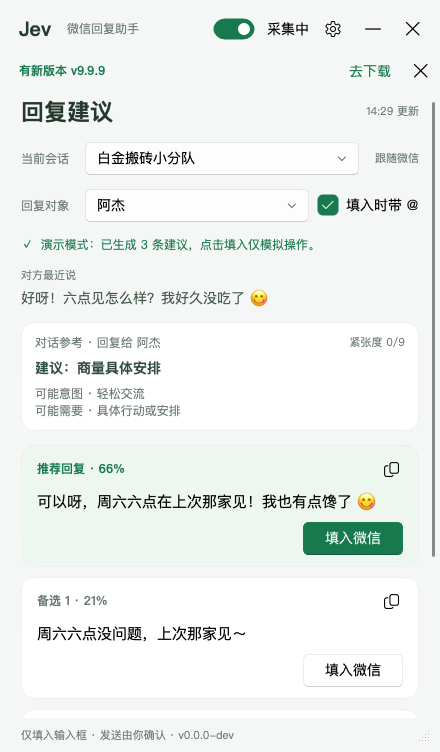
Read a Windows chat locally and use Jev to assess intent and rank suggested replies.
Added to Jevfast
NewRead a Windows chat locally and use Jev to assess intent and rank suggested replies.
JevChat sends the chat context as state with fixed Noul and Choice questions for interpreting the other person's intent and needs, assessing tension, and selecting a next action. It then drafts candidate replies with a separate language model and asks Jev to rank two or three candidates using the dynamic `best_reply` Choice question. The selected candidate becomes the recommendation.
Is the latest message meant literally, without subtext? Judge from the whole thread.
Conversation context and the other person’s latest message, supplied by local OCR and chat selection.
Send chat state and fixed judgment questions to the configured Jev provider.
Use the separate LLM provider to draft candidate replies, guided by the first Jev answers when available.
Add a Choice question keyed `best_reply` when two or three candidates exist, call Jev, and use the returned choice and probabilities to order the displayed candidates.
Display the selected candidate together with intent, need, and tension judgments.
The system separates interpretation from drafting: Jev supplies structured judgments, a text model writes candidate replies, and a second Jev call ranks those candidates. Its questions encode detailed conversation-specific criteria, including when to check history, acknowledge, apologize, or say less.