
 New
NewJev as Robot Policy
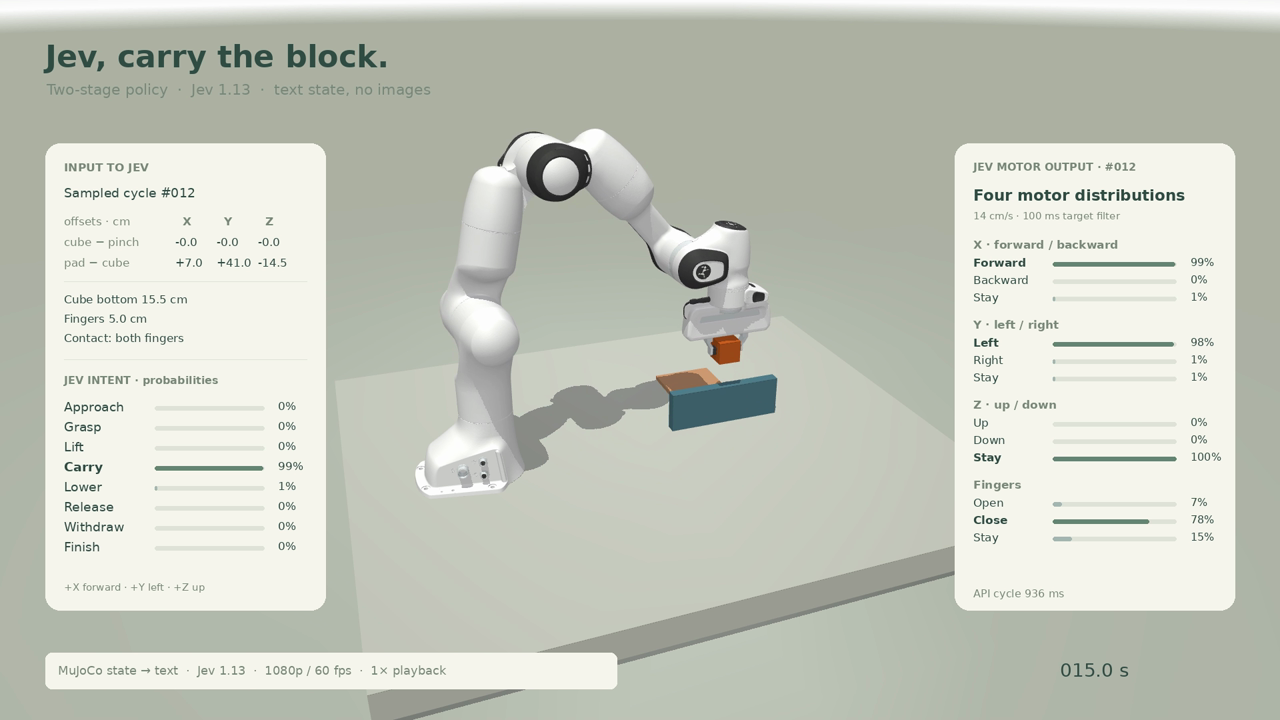
The controller first asks Jev to select a manipulation intent from the task and observed geometry facts.
Added to Jevfast
NewThe controller first asks Jev to select a manipulation intent from the task and observed geometry facts.
The controller first asks Jev to select a manipulation intent from the task and observed geometry facts. It then re-observes the arm, builds a target-relative state, and asks four Choice questions for x, y, z movement and finger position. Local code converts geometry into alignment/contact facts and turns the selected motor answers into controller actions.
Choose the next manipulation intent whose conditions match current facts.
Task name, geometry-derived observed facts, previous intent, and object height; the allowed intent criteria depend on task mode.
Move along x toward the target or stay when aligned.
Selected intent, its definition, task name, current target-relative direction for each axis, geometry facts, and local target offsets.
Move along y toward the target or stay when aligned.
Selected intent, its definition, task name, current target-relative direction for each axis, geometry facts, and local target offsets.
Move along z toward the target or stay when aligned.
Selected intent, its definition, task name, current target-relative direction for each axis, geometry facts, and local target offsets.
Open, close, or keep the current finger opening based on intent and grasp-height facts.
Selected intent, its definition, task name, current target-relative direction for each axis, geometry facts, and local target offsets.
Local geometry code derives contact, alignment, height, and finger-state facts from simulator state.
Jev selects among intent criteria that match current facts; lift-only task mode narrows and changes the criteria.
The arm may move during intent inference, so the code samples current geometry again before requesting motor choices.
Jev returns axis and finger choices; local controller code performs the movement.
The design keeps geometry arithmetic and motion execution in the harness while Jev handles semantic intent and bounded motor choices. It refreshes observations between the dependent intent and motor requests.